
Training & Education Network 02 Bis Dinh Tien Hoang Street, Dakao Ward, District !, HCMC – Tel: (848) 824 4041 – Fax: (848) 824 4041 E-mail: training@athenavn.com – URL: www.athenavn.com B ÀI 27: CẤU HÌNH ISDN DDR
1. Giới thiệu :
ISDN (Integrated Services Digital Network) là mạng số tích hợp đa dịch vụ, cung cấp cho chúng ta nhiều loại hình dịch vụ số khác nhau, bao gồm : data và thoại. ISDN cho phép truyền các kênh số đồng thời trên dây điện thoại thông thường.
Kỹ thuật dial-on-demand routing (DDR) được phát triển bởi Cisco cho phép chúng ta sử dụng đường dây điện thoại để tạo thành một mạng WAN. DDR cho phép router thực hiện kết nối khi có traffic được gửi và ngắt kết nối khi không cần đến. Điều này giúp chúng ta tiết kiệm được chi phí rất nhiều. Trong kỹ thuật DDR, chỉ khi gặp interesting traffic router mới thực hiện kết nối, ngoài ra thì không. Điều này giúp chúng ta quản lý được mạng tốt hơn. Ngoài ra, DDR sử dụng idle timeout để xác định thời gian để router ngắt kết nối nếu như không có interesting traffic nào được gửi.
2. Các câu lệnh sử dụng trong bài lab :
•
• isdn switch-type switch-type Cấu hình loại của ISDN switch isdn spid1 spid−number [ldn] Cấu hình số SPID và ldn • dialer-list dialer-group-num protocol protocol-name {permit | deny | list access-list-number} Tạo dialer list để định nghĩa intersting traffic cho router. • dialer-group group-number Nhúng dialer list vào một interface • dialer idle-timeout seconds
Cấu hình thời gian idle-timeout • dialer pool−member number
Tạo dialer pool • dialer pool number Nhúng một dialer interface vào dialer pool
• dialer remote−name username Cấu hình tên của router đầu xa • dialer string dial−string Cấu hình số để quay kết nối với router đầu xa
3. Mô tả bài lab và đồ hình :
Tài liệu hướng dẫn thực hành CCNA
153
Training & Education Network 02 Bis Dinh Tien Hoang Street, Dakao Ward, District !, HCMC – Tel: (848) 824 4041 – Fax: (848) 824 4041 E-mail: training@athenavn.com – URL: www.athenavn.com
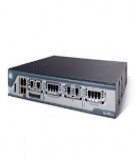
Trong bài Lab này chúng ta sử dụng hai router có cổng BRI và thiết bị mô phỏng môi trường
Chúng ta khởi tạo Loopback 0, Loopback 1, Loopback 2 ở cả hai router. Địa chỉ các cổng
ISDN. Cáp nối từ cổng BRI của router đến thiết bị mô phỏng môi trường BRI là cáp thằng. được chú thích ngay trên đồ hình. Password của cả hai router là : cisco 4. Mục tiêu bài lab : Cấu hình kết nối giữa hai router thông qua môi trường ISDN trong chế dộ Dial-on-demand
routing (DDR) sử dụng interface dialer. 5. Cấu hình router : • Bước 1: cấu hình tên router, các interface loopback và mở đường telnet ở hai router
Athena1#sh run Current configuration : 1301 bytes version 12.1 hostname Athena1 enable password cisco interface Loopback0 ip address 10.1.0.1 255.255.255.0 interface Loopback1 ip address 11.1.0.1 255.255.255.0 interface Loopback2 ip address 12.1.0.1 255.255.255.0 line con 0 line aux 0 line vty 0 4 password cisco login end Athena2#sh run Current configuration : 1204 bytes version 12.1 hostname Athena2 enable password cisco interface Loopback0 ip address 13.1.0.1 255.255.255.0 interface Loopback1 ip address 14.1.0.1 255.255.255.0 interface Loopback2 ip address 15.1.0.1 255.255.255.0 line con 0 line aux 0 line vty 0 4 password cisco login end
• Bước 2: Cấu hình loại ISDN Switch sử dụng và số SPID và ldn.
Tài liệu hướng dẫn thực hành CCNA
154
Training & Education Network 02 Bis Dinh Tien Hoang Street, Dakao Ward, District !, HCMC – Tel: (848) 824 4041 – Fax: (848) 824 4041 E-mail: training@athenavn.com – URL: www.athenavn.com
Số SPID và ldn được cung cấp bởi nhà cung cấp dịch vụ ISDN.
← Cấu hình loại ISDN witch
Athena1#conf t Athena1(config)#isdn switch-type basic-net3 Athena1(config)# in bri0 Athena1(config-if)#isdn spid1 21 21 ← Cấu hình số SPID và ldn
Athena2#conf t Athena2(config)#isdn switch-type basic-net3 Athena2(config)# in bri0 Athena2(config-if)#isdn spid1 11 11
• Bước 3 : Định tuyến cho các router
Ở đây chúng ta dùng Static route để định tuyến cho các router chứ không dùng các giao thức định tuyến động như RIP, IGRP … Lý do ta phải dùng static route se được giải thích ở mục Nguyên nhân không nên dùng các giao thức định tuyến động trong cấu hình ISDN DDR
Athena1#conf t Athena1(config)#ip route 13.1.0.0 255.255.255.0 192.168.0.2 Athena1(config)#ip route 14.1.0.0 255.255.255.0 192.168.0.2 Athena1(config)#ip route 15.1.0.0 255.255.255.0 192.168.0.2 Athena2#conf t Athena2(config)#ip route 10.1.0.0 255.255.255.0 192.168.0.1 Athena2(config)#ip route 11.1.0.0 255.255.255.0 192.168.0.1 Athena2(config)#ip route 12.1.0.0 255.255.255.0 192.168.0.1
• Bước 4 : Cấu hình interesting traffic
Router chỉ thực hiện kết nối khi và chỉ khi gặp các interesting traffic; ngoài ra, router sẽ không kết nối. Interesting traffic được định nghĩa cho router bằng : loại traffic, nguồn hoặc đích đến của một gói tin. (thông qua access list). Interesting traffic được cấu hình bằng câu lệnh dialer-list. Trong bài này, đối với router Athena1, chúng ta cấu hình interesting traffic là tất cả các traffic khác traffic telnet đến mạng 14.1.0.0/24. Chúng ta dùng Extended access list để cấu hình.
Athena1#conf t Athena1(config)#access-list 101 deny tcp any 14.1.0.0 0.0.0.255 eq telnet Athena1(config)#access-list 101 permit ip any any Athena1(config)#dialer-list 1 protocol ip list 1
Đối với router Athena2, cấu hình các traffic của mạng 13.1.0.0/24 và 14.1.0.0/24 là interesting traffic. Chúng ta dùng Standard access list để cấu hình.
Athena2#conf t Athena2(config)#access-list 1 permit 13.1.0.0 0.0.0.255 Athena2(config)#access-list 1 permit 14.1.0.0 0.0.0.255 Athena2(config)#dialer-list 1 protocol ip list 1
• Bước 5 : Cấu hình interface dialer cho router Trong bài chúng ta sử dụng PPP thay cho HDLC vì PPP có tính bảo mật cao. Mặc định của router Cisco sử dụng HDLC.
Athena1(config)#username Athena2 password cisco Athena1(config-if)#in bri0 Athena1(config-if)#encapsulation ppp
Tài liệu hướng dẫn thực hành CCNA
155
Training & Education Network 02 Bis Dinh Tien Hoang Street, Dakao Ward, District !, HCMC – Tel: (848) 824 4041 – Fax: (848) 824 4041 E-mail: training@athenavn.com – URL: www.athenavn.com
dialer pool 1
Athena1(config-if)#ppp authentication chap Athena1(config-if)#dialer pool-member 1 ← Cấu hình interface BRI0 thuộc Athena1(config-if)#no shut Athena1(config-if)#exit Athena1(config)#in dialer 1 Athena1(config-if)# ip address 192.168.0.1 255.255.255.0 Athena1(config-if)#encapsulation ppp Athena1(config-if)#ppp authentication chap Athena1(config-if)#dialer remote-name Athena2 ← Cấu hình tên router kết nối ← Cấu hình số để gọi cho router đó Athena1(config-if)#dialer string 11 Athena1(config-if)#dialer pool 1 ← Cấu hình interface dialer 1 thuộc pool 1 Athena1(config-if)#dialer idle-timeout 180 ← Router sẽ ngắt kết nối nếu như không có traffic nào truyền trong khoảng thời gian cấu hình Athena1(config-if)#dialer-group 1 ← Sử dụng dialer list 1 cho interface này Athena1(config-if)#no shut Athena1(config-if)#exit
Cấu hình tương tự cho router Athena2
Athena2(config)#username Athena1 password cisco Athena2(config-if)#in bri0 Athena2(config-if)#encapsulation ppp Athena2(config-if)#ppp authentication chap Athena2(config-if)#dialer pool-member 1 Athena2(config-if)#no shut Athena2(config-if)#exit Athena2(config)#in dialer 0 Athena2(config-if)# ip address 192.168.0.2 255.255.255.0 Athena2(config-if)#encapsulation ppp Athena2(config-if)#ppp authentication chap Athena2(config-if)#dialer remote-name Athena1 Athena2(config-if)#dialer string 21 Athena2(config-if)#dialer pool 1 Athena2(config-if)#dialer idle-timeout 180 Athena2(config-if)#dialer-group 1 Athena2(config-if)#no shut Athena2(config-if)#exit
6. Kiểm tra kết quả :
• Kiểm tra trạng thái kết nối của interface BRI0
dsl 0, interface ISDN Switchtype = basic-net3
ACTIVE
Athena1#sh isdn status Global ISDN Switchtype = basic-net3 ISDN BRI0 interface Layer 1 Status: Layer 2 Status: TEI = 64, Ces = 1, SAPI = 0, State = MULTIPLE_FRAME_ESTABLISHED
Tài liệu hướng dẫn thực hành CCNA
156
Training & Education Network 02 Bis Dinh Tien Hoang Street, Dakao Ward, District !, HCMC – Tel: (848) 824 4041 – Fax: (848) 824 4041 E-mail: training@athenavn.com – URL: www.athenavn.com
1 Active Layer 3 Call(s) CCB:callid=8004, sapi=0, ces=1, B-chan=1, calltype=DATA
Layer 3 Status: Active dsl 0 CCBs = 1 The Free Channel Mask: 0x80000002 Number of L2 Discards = 0, L2 Session ID = 0 Total Allocated ISDN CCBs = 1
thì thái của Layer 1 là ACTIVE và Layer 2 là Nếu cấu hình đúng trạng MULTIPLE_FRAME_ESTABLISHED.
• Kiểm tra các interesting traffic. Đứng ở router Athena2, chúng ta ping từ interface loopback 1 (14.1.0.1) đến interface loopback 2 (12.1.0.1) của router Athena1 Athena2#ping
Protocol [ip]: Target IP address: 12.1.0.1 Repeat count [5]: Datagram size [100]: Timeout in seconds [2]: Extended commands [n]: y Source address or interface: 14.1.0.1 Type of service [0]: Set DF bit in IP header? [no]: Validate reply data? [no]: Data pattern [0xABCD]: Loose, Strict, Record, Timestamp, Verbose[none]: Sweep range of sizes [n]: Type escape sequence to abort. Sending 5, 100-byte ICMP Echos to 12.1.0.1, timeout is 2 seconds:
00:30:15: %LINK-3-UPDOWN: Interface BRI0:1, changed state to up 00:30:15: %DIALER-6-BIND: Interface BR0:1 bound to profile Di0.!!!! Success rate is 80 percent (4/5), round-trip min/avg/max = 32/35/36 ms 00:30:16: %LINEPROTO-5-UPDOWN: Line protocol on Interface BRI0:1, changed state to up 00:30:21: %ISDN-6-CONNECT: Interface BRI0:1 is now connected to 21 Athena1
Seconds Used Remote Name Athena1 14 Charges Units/currency 0 Seconds Idle 12 Seconds Left 167 Calling Number Called Number 21 Nhận xét : ping thành công và router Athena2 thực hiện kết nối với router Athena1 sử dùng interface dialer 0 Chúng ta dùng câu lệnh show isdn active để xem những thông tin về cuộc kết nối hiện hành Athena2#sh isdn active ISDN ACTIVE Call Type Out
Tài liệu hướng dẫn thực hành CCNA
157
Training & Education Network 02 Bis Dinh Tien Hoang Street, Dakao Ward, District !, HCMC – Tel: (848) 824 4041 – Fax: (848) 824 4041 E-mail: training@athenavn.com – URL: www.athenavn.com Còn 167 giây nữa thì router sẽ ngắt kết nối nếu như không có interesting traffic nào gửi qua đường kết nối. Chúng ta chờ khoảng 180 giây nữa để kiểm tra việc router ngắt kết nối tự động (Lưu ý : không ping bất cứ mạng nào!) Sau 180 giây chúng ta sẽ được kết quả như sau : Athena2#
00:33:16: %DIALER-6-UNBIND: Interface BR0:1 unbound from profile Di0 00:33:16: %ISDN-6-DISCONNECT: Interface BRI0:1 disconnected from 21 Athena1, call lasted 181 seconds 00:33:17: %LINK-3-UPDOWN: Interface BRI0:1, changed state to down 00:33:18: %LINEPROTO-5-UPDOWN: Line protocol on Interface BRI0:1, changed state to down
Router đã ngắt tự động ngắt kết nối khi không có interesting traffic nào được gửi qua đường truyền. Làm lại các bước trên để kiểm tra các interesting traffic còn lại của router Athena2.
Athena2#ping Protocol [ip]: Target IP address: 10.1.0.1 Repeat count [5]: Datagram size [100]: Timeout in seconds [2]: Extended commands [n]: y Source address or interface: 13.1.0.1 Type of service [0]: Set DF bit in IP header? [no]: Validate reply data? [no]: Data pattern [0xABCD]: Loose, Strict, Record, Timestamp, Verbose[none]: Sweep range of sizes [n]: Type escape sequence to abort. Sending 5, 100-byte ICMP Echos to 12.1.0.1, timeout is 2 seconds: 00:30:15: %LINK-3-UPDOWN: Interface BRI0:1, changed state to up 00:30:15: %DIALER-6-BIND: Interface BR0:1 bound to profile Di0.!!!! Success rate is 80 percent (4/5), round-trip min/avg/max = 32/35/36 ms 00:30:16: %LINEPROTO-5-UPDOWN: Line protocol on Interface BRI0:1, changed state to up 00:30:21: %ISDN-6-CONNECT: Interface BRI0:1 is now connected to 21 Athena1
và sau 180 giây, ta được : Athena2#
00:33:16: %DIALER-6-UNBIND: Interface BR0:1 unbound from profile Di0 00:33:16: %ISDN-6-DISCONNECT: Interface BRI0:1 disconnected from 21 Athena1, call lasted 181 seconds 00:33:17: %LINK-3-UPDOWN: Interface BRI0:1, changed state to down 00:33:18: %LINEPROTO-5-UPDOWN: Line protocol on Interface BRI0:1, changed state to down
Khi ta thực hiện ping một mạng nào đó của router Athena1 từ interface loopback 2 (15.1.0.1) thì router sẽ không kết nối. Do các gói tin từ mạng 15.1.0.0/24 không phải là interesting traffic. Athena2#ping
Tài liệu hướng dẫn thực hành CCNA
158
Training & Education Network 02 Bis Dinh Tien Hoang Street, Dakao Ward, District !, HCMC – Tel: (848) 824 4041 – Fax: (848) 824 4041 E-mail: training@athenavn.com – URL: www.athenavn.com
Protocol [ip]: Target IP address: 11.1.0.1 Repeat count [5]: Datagram size [100]: Timeout in seconds [2]: Extended commands [n]: y Source address or interface: 15.1.0.1 Type of service [0]: Set DF bit in IP header? [no]: Validate reply data? [no]: Data pattern [0xABCD]: Loose, Strict, Record, Timestamp, Verbose[none]: Sweep range of sizes [n]: Type escape sequence to abort. Sending 5, 100-byte ICMP Echos to 11.1.0.1, timeout is 2 seconds: ..... Success rate is 0 percent (0/5) Athena2#sh isdn active
ISDN ACTIVE Call Type Calling Number Called Number Remote Name Seconds Used Seconds Left Seconds Idle Charges Units/currency
Bây giờ chúng ta se kiểm tra interesting traffic của router Athena1. Đứng ở router Athena1, chúng ta ping đến 14.1.0.1 từ một interface loopback bất kỳ.
Athena1#ping Protocol [ip]: Target IP address: 14.1.0.1 Repeat count [5]: Datagram size [100]: Timeout in seconds [2]: Extended commands [n]: y Source address or interface: 10.1.0.1 Type of service [0]: Set DF bit in IP header? [no]: Validate reply data? [no]: Data pattern [0xABCD]: Loose, Strict, Record, Timestamp, Verbose[none]: Sweep range of sizes [n]: Type escape sequence to abort. Sending 5, 100-byte ICMP Echos to 14.1.0.1, timeout is 2 seconds: 00:38:30: %LINK-3-UPDOWN: Interface BRI0:1, changed state to up 00:38:30: %DIALER-6-BIND: Interface BR0:1 bound to profile Di1.!!!! Success rate is 80 percent (4/5), round-trip min/avg/max = 32/34/36 ms Athena1# 00:38:31: %LINEPROTO-5-UPDOWN: Line protocol on Interface BRI0:1, changed state to up Athena1#
Tài liệu hướng dẫn thực hành CCNA
159
Training & Education Network 02 Bis Dinh Tien Hoang Street, Dakao Ward, District !, HCMC – Tel: (848) 824 4041 – Fax: (848) 824 4041 E-mail: training@athenavn.com – URL: www.athenavn.com 00:38:36: %ISDN-6-CONNECT: Interface BRI0:1 is now connected to 11 Athena2
Nhận xét : router thực hiện kết nối với router Athena2, và gói tin được truyền đi. Chờ sau 180 giây để router tự động ngắt kết nối. Sau đó chúng ta thực hiện telnet đến 14.1.0.1.
Athena1#telnet 14.1.0.1 Trying 14.1.0.1 ... % Connection timed out; remote host not responding
Nhận xét : chúng ta không thể telnet được. Nguyên nhân là do chúng ta đã cấm telnet đến mạng 14.1.0.0 từ bất kỳ một mạng nào(access-list 101 deny tcp any 14.1.0.0 0.0.0.255 eq telnet). Do đó, traffic telnet đến 14.1.0.1 không phải là interesting traffic nên router không thực hiện kết nối.
Chúng ta telnet đến 13.1.0.1 : Athena1#telnet 13.1.0.1 Trying 13.1.0.1 ... 00:42:30: %LINK-3-UPDOWN: Interface BRI0:1, changed state to up 00:42:30: %DIALER-6-BIND: Interface BR0:1 bound to profile Di1 open 00:42:31: %LINEPROTO-5-UPDOWN: Line protocol on Interface BRI0:1, changed state to up
← Chúng ta nhập password là cisco để telnet vào Athena2 00:42:36: %ISDN-6-CONNECT: Interface BRI0:1 is now connected to 11 Athena2 User Access Verification Password: cisco Athena2>
Nhận xét : router thực hiện kết nối. Do chúng ta telnet vào mạng 13.1.0.0/24 chứ không phải mạng 14.1.0.0. Đây là một interesting traffic.
7. Nguyên nhân không nên dùng các giao thức định tuyến động trong cấu hình
ISDN DDR Để thấy được nguyên nhân chúng ta sẽ cấu hình giao thức RIP trên cả 2 router thay cho static
route.
Chúng ta xóa NVRAM, reload cả hai route trước khi cấu hình lại các router như sau :
Athena1#sh run Building configuration... Current configuration : 1205 bytes version 12.1 no service single-slot-reload-enable service timestamps debug uptime
Tài liệu hướng dẫn thực hành CCNA
160
Training & Education Network 02 Bis Dinh Tien Hoang Street, Dakao Ward, District !, HCMC – Tel: (848) 824 4041 – Fax: (848) 824 4041 E-mail: training@athenavn.com – URL: www.athenavn.com
service timestamps log uptime no service password-encryption hostname Athena1 enable password cisco username Athena2 password cisco isdn switch-type basic-net3 interface Loopback0 ip address 10.1.0.1 255.255.255.0 interface Loopback1 ip address 11.1.0.1 255.255.255.0 interface Loopback2 ip address 12.1.0.1 255.255.255.0 interface BRI0 no ip address encapsulation ppp dialer pool-member 1 isdn switch-type basic-net3 isdn spid1 21 21 ppp authentication chap interface Dialer1 ip address 192.168.0.1 255.255.255.0 encapsulation ppp dialer pool 1 dialer remote-name Athena2 dialer idle-timeout 180 dialer string 11 dialer-group 1 ppp authentication chap access-list 1 permit any dialer-list 1 protocol ip list 1 router rip network 10.0.0.0 network 11.0.0.0 network 12.0.0.0 network 192.168.0.0 line con 0 line aux 0 line vty 0 4 password cisco login end Athena2#sh run Building configuration... Current configuration : 1150 bytes version 12.1 hostname Athena2
Tài liệu hướng dẫn thực hành CCNA
161
Training & Education Network 02 Bis Dinh Tien Hoang Street, Dakao Ward, District !, HCMC – Tel: (848) 824 4041 – Fax: (848) 824 4041 E-mail: training@athenavn.com – URL: www.athenavn.com
enable password cisco username Athena1 password cisco isdn switch-type basic-net3 interface Loopback0 ip address 13.1.0.1 255.255.255.0 interface Loopback1 ip address 14.1.0.1 255.255.255.0 interface Loopback2 ip address 15.1.0.1 255.255.255.0 interface BRI0 no ip address encapsulation ppp dialer pool-member 1 isdn switch-type basic-net3 isdn spid1 11 11 ppp authentication chap interface Dialer0 ip address 192.168.0.2 255.255.255.0 encapsulation ppp dialer pool 1 dialer remote-name Athena1 dialer idle-timeout 180 dialer string 21 dialer-group 1 ppp authentication chap access-list 1 permit any dialer-list 1 protocol ip list 1 router rip network 13.0.0.0 network 14.0.0.0 network 15.0.0.0 network 192.168.0.0 line con 0 line aux 0 line vty 0 4 password cisco login end Sử dụng câu lệnh show ip route để kiểm tra lại bảng định tuyến của các router : Athena2#sh ip Gateway of last resort is not set R 10.0.0.0/8 [120/1] via 192.168.0.1, 00:00:03, Dialer0 R 11.0.0.0/8 [120/1] via 192.168.0.1, 00:00:03, Dialer0 192.168.0.0/24 is variably subnetted, 2 subnets, 2 masks C 192.168.0.0/24 is directly connected, Dialer0 C 192.168.0.1/32 is directly connected, Dialer0
Tài liệu hướng dẫn thực hành CCNA
162
Training & Education Network 02 Bis Dinh Tien Hoang Street, Dakao Ward, District !, HCMC – Tel: (848) 824 4041 – Fax: (848) 824 4041 E-mail: training@athenavn.com – URL: www.athenavn.com
R 12.0.0.0/8 [120/1] via 192.168.0.1, 00:00:03, Dialer0 13.0.0.0/24 is subnetted, 1 subnets C 13.1.0.0 is directly connected, Loopback0 14.0.0.0/24 is subnetted, 1 subnets C 14.1.0.0 is directly connected, Loopback1 15.0.0.0/24 is subnetted, 1 subnets C 15.1.0.0 is directly connected, Loopback2
Kiểm tra lại kết nối hiện hành bằng lệnh show isdn active (lúc này hai router đã kết nối với nhau, do ta cấu hình tất cả các gói tin đều là interesting traffic : access-list 1 permit any nên khi RIP gửi các gói routing update thì router tự động kết nối). Athena1#sh isdn active
Seconds Used Called Number 11 Remote Name Athena2 350 Seconds Left 152 Seconds Idle 27 Charges Units/currency 0 Calling Number ISDN ACTIVE Call Type Out
Cứ sau khoảng 30 giây chúng ta lập lại câu lệnh show isdn active để kiểm tra thời gian còn lại để router ngắt kết nối (Lưu ý : không truyền bất kỳ một traffic nào qua lại giữa hai router để ta có được kết quả chính xác) Athena1#sh isdn active
Seconds Used Called Number 11 Remote Name Athena2 359 Seconds Left 171 Seconds Idle 8 Charges Units/currency 0 Calling Number ISDN ACTIVE Call Type Out Athena1#sh isdn active
Seconds Used Calling Number Called Number 11 Remote Name Athena2 375 Seconds Left 154 Seconds Idle 25 Charges Units/currency 0 ISDN ACTIVE Call Type Out Athena1#sh isdn active
Seconds Used Called Number 11 Calling Number Seconds Left 179 Remote Name Athena2 377 Charges Units/currency 0 Seconds Idle 0
ISDN ACTIVE Call Type Out Nhận xét : thời gian còn lại để router tự động ngắt kết nối (idle-timeout) không bao giờ xuống được 0. Do giao thức RIP cứ 30 giây gửi update một lần. Tương tự cho các giao thức định tuyến động khác. Trong trường hợp thời gian idle-timeout nhỏ hơn 30 giây thì router sẽ đóng ngắt kết nối liên tục. Vì vậy chúng ta không nên sử dụng định tuyến động trong cấu hình ISDN DDR. Sử dụng static route sẽ cho hiệu quả cao hơn.
Tài liệu hướng dẫn thực hành CCNA
163





![Bài tập Tin học ứng dụng [nâng cao/cơ bản]](https://cdn.tailieu.vn/images/document/thumbnail/2025/20250824/shenkilltv@gmail.com/135x160/60111756087501.jpg)





%20--%3e%3cdefs%3e%3cstyle%3e%20.st0%20{%20fill:%20%23fff;%20}%20.st1%20{%20fill:%20%237800fa;%20}%20%3c/style%3e%3c/defs%3e%3cpath%20class='st1'%20d='M117.78,12.18H43.11c2.9,3.47,4.65,7.94,4.65,12.82,0,5.6-2.3,10.66-6.01,14.29h76.02l7.22-13.56-7.22-13.56Z'/%3e%3cg%3e%3cpath%20class='st0'%20d='M53.58,26.17h-.59v-1.46h.59v-4.96h2.83c1.78,0,2.67.94,2.67,2.82v5.76c0,1.87-.89,2.81-2.67,2.81h-2.83v-4.96ZM55.36,21.37v3.34h1.1v1.46h-1.1v3.34h1.01c.61,0,.91-.37.91-1.1v-5.93c0-.74-.3-1.1-.91-1.1h-1.01Z'/%3e%3cpath%20class='st0'%20d='M65.99,31.14h-1.8l-.31-2.07h-2.19l-.31,2.07h-1.64l1.82-11.39h2.62l1.82,11.39ZM65.28,18.04c-.25.46-.51.77-.75.94-.21.15-.47.22-.79.22-.26,0-.57-.07-.92-.22l-.38-.15c-.14-.05-.26-.07-.37-.07-.3,0-.53.18-.71.54l-.91-.68c.25-.46.51-.77.75-.94.21-.14.48-.21.79-.21.26,0,.57.07.92.21l.38.15c.14.05.26.07.37.07.3,0,.53-.18.71-.54l.91.68ZM61.91,27.52h1.73l-.87-5.76-.87,5.76Z'/%3e%3cpath%20class='st0'%20d='M74.53,26.89v1.52c0,1.91-.89,2.86-2.67,2.86s-2.67-.95-2.67-2.86v-5.93c0-1.91.89-2.86,2.67-2.86s2.67.95,2.67,2.86v1.11h-1.69v-1.22c0-.75-.31-1.12-.93-1.12s-.93.37-.93,1.12v6.15c0,.74.31,1.11.93,1.11s.93-.37.93-1.11v-1.63h1.69Z'/%3e%3cpath%20class='st0'%20d='M81.4,31.14h-1.8l-.31-2.07h-2.19l-.31,2.07h-1.64l1.82-11.39h2.62l1.82,11.39ZM75.9,19.2l1.52-1.91h1.71l1.51,1.91h-1.61l-.76-.95-.75.95h-1.61ZM77.32,27.52h1.73l-.87-5.76-.87,5.76ZM83.1,15.99l-1.76,1.91h-1.26l1.17-1.91h1.86Z'/%3e%3cpath%20class='st0'%20d='M84.86,19.75c1.78,0,2.67.94,2.67,2.82v1.48c0,1.87-.89,2.81-2.67,2.81h-.85v4.28h-1.79v-11.39h2.64ZM84.01,21.37v3.86h.85c.58,0,.87-.36.87-1.08v-1.71c0-.71-.29-1.07-.87-1.07h-.85Z'/%3e%3cpath%20class='st0'%20d='M93.51,19.75c1.78,0,2.67.94,2.67,2.82v1.48c0,1.87-.89,2.81-2.67,2.81h-.85v4.28h-1.79v-11.39h2.64ZM92.66,21.37v3.86h.85c.58,0,.87-.36.87-1.08v-1.71c0-.71-.29-1.07-.87-1.07h-.85Z'/%3e%3cpath%20class='st0'%20d='M98.8,31.14h-1.79v-11.39h1.79v4.88h2.03v-4.88h1.83v11.39h-1.83v-4.88h-2.03v4.88Z'/%3e%3cpath%20class='st0'%20d='M105.36,24.55h2.46v1.62h-2.46v3.34h3.09v1.63h-4.88v-11.39h4.88v1.63h-3.09v3.18ZM108.17,17.29l-1.76,1.91h-1.26l1.17-1.91h1.86Z'/%3e%3cpath%20class='st0'%20d='M112.2,19.75c1.78,0,2.67.94,2.67,2.82v1.48c0,1.87-.89,2.81-2.67,2.81h-.85v4.28h-1.79v-11.39h2.64ZM111.35,21.37v3.86h.85c.58,0,.87-.36.87-1.08v-1.71c0-.71-.29-1.07-.87-1.07h-.85Z'/%3e%3c/g%3e%3ccircle%20class='st1'%20cx='25'%20cy='25'%20r='20'/%3e%3cpath%20class='st0'%20d='M32.78,19.27c2.92,0,4.43,2.55,5.28,5.33l.71,2.17c.14.38-.33.75-.71.75h-5.61c.19-.33.24-.71.09-1.08l-.75-2.45c-.43-1.32-.99-2.64-1.79-3.77.75-.57,1.65-.94,2.78-.94h0ZM25,18.38c3.25,0,4.9,2.78,5.89,5.89l.76,2.45c.14.42-.33.8-.8.8h-11.69c-.42,0-.94-.38-.8-.8l.75-2.45c.99-3.11,2.64-5.89,5.89-5.89h0ZM25,11.35c1.74,0,3.11,1.37,3.11,3.11s-1.37,3.11-3.11,3.11-3.11-1.41-3.11-3.11,1.41-3.11,3.11-3.11h0ZM17.27,19.27c1.08,0,1.98.38,2.73.94-.8,1.13-1.37,2.45-1.74,3.77l-.8,2.45c-.14.38-.05.75.09,1.08h-5.56c-.42,0-.9-.38-.75-.75l.71-2.17c.9-2.78,2.41-5.33,5.33-5.33h0ZM17.27,12.91c1.51,0,2.78,1.27,2.78,2.83s-1.27,2.83-2.78,2.83-2.83-1.27-2.83-2.83,1.27-2.83,2.83-2.83h0ZM32.78,12.91c1.56,0,2.78,1.27,2.78,2.83s-1.23,2.83-2.78,2.83-2.83-1.27-2.83-2.83,1.27-2.83,2.83-2.83h0ZM27.07,28.56v.09c0,.57-.24,1.08-.61,1.46h0v.05c-.38.33-.9.57-1.46.57s-1.08-.24-1.46-.61h0c-.38-.38-.61-.9-.61-1.46v-.09h1.41v.09c0,.19.05.38.19.47v.05c.09.09.28.19.47.19s.38-.09.47-.19v-.05c.14-.09.24-.28.24-.47t-.05-.09h1.41ZM30.99,28.56v.09c0,1.65-.66,3.16-1.74,4.24-1.08,1.08-2.59,1.79-4.24,1.79s-3.16-.71-4.24-1.79l-.05-.05c-1.04-1.08-1.7-2.55-1.7-4.2v-.09h1.41v.09c0,1.27.47,2.4,1.27,3.25h.05c.85.85,1.98,1.37,3.25,1.37s2.4-.52,3.25-1.37c.85-.8,1.37-1.98,1.37-3.25v-.09h1.37ZM34.99,28.56v.09c0,2.78-1.13,5.28-2.92,7.07-1.79,1.79-4.29,2.92-7.07,2.92s-5.23-1.13-7.07-2.92c-1.79-1.79-2.92-4.29-2.92-7.07v-.09h1.41v.09c0,2.4.94,4.53,2.5,6.08,1.56,1.56,3.72,2.5,6.08,2.5s4.52-.94,6.08-2.5c1.56-1.56,2.5-3.68,2.5-6.08v-.09h1.41Z'/%3e%3c/svg%3e)