
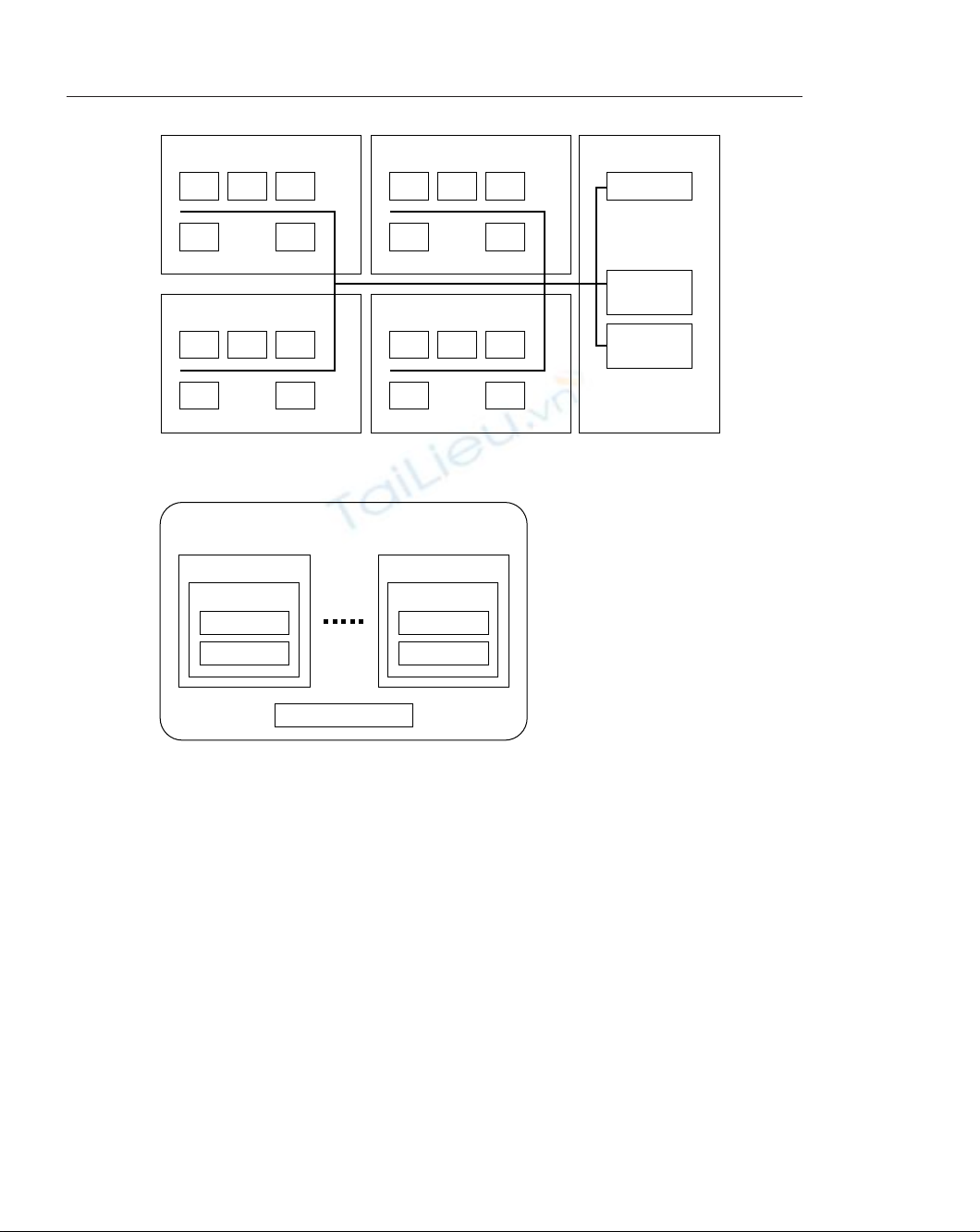
Figure 4-1: A typical intranet-enabled company.
Figure 4-2: User requirements for a typical intranet-enabled company.
Each intranet application you develop must be able to authenticate and autho-
rize different types of users. For example, an employee vacation management
application has to incorporate the hierarchical chain of command that enables
employee vacation requests to be reviewed and approved first by team leaders and
then by the department head. So far, our intranet application framework has the
following requirements:
◆Central authentication: Users need to be authenticated to access intranet
applications. There are likely to be many intranet applications within an
organization and therefore user authentication should be done such that
a user logs in only once to access any application. A session should be
Any Department
Department Head
Team
Employee
Project 1
Team Leader
Team
Employee
Project (n)
Team Leader
Marketing
PC
PC PC
Engineering
PC PCPC
PC PC
Sales MIS
PC PCPC
PC PC
Intranet
Server
Firewall
Database
Server
Administration
PC PCPC
PC PC
66 Part II: Developing Intranet Solutions
07 549669 ch04.qxd 4/4/03 9:24 AM Page 66

created that allows all applications to identify an authenticated user.
When a user attempts to access an intranet application without logging in
first, the application should automatically redirect the user to the login
application. When the user is successfully authenticated via the login
application, she should be automatically forwarded back to the applica-
tion she had been attempting to access. The login process should be seam-
less. Similarly, a central, seamless logout facility should be provided to
allow the users to log out from the intranet.
◆Application-specific authorization: Different types of users exist in an
intranet and, therefore, intranet applications must discriminate when
authorizing users. Employee access to an intranet application will vary.
Because each application will have different requirements for authorizing
the user, the task of authorization should be left to the application itself.
◆A shared database: Most intranet activity involves collaboration or group
efforts. For example, users working in a team within a project might need
to report the status of the project tasks individually, but the team leader or
department head needs to access the information from the entire team to
make technical or business decisions. A shared database is therefore the
solution to store data.
Based on these requirements, let’s go ahead and build an intranet application
framework.
Building an Intranet Application
Framework
An intranet consists of many applications. It is a good idea to create an application
framework that provides a set of commonly needed objects and services to imple-
ment applications. Typical intranet applications have user authentication require-
ments, database access requirements, user interfaces requirements, and business
logic requirements. Each application’s business logic, which is the work done by the
application, is unique and must be implemented in the application code itself.
However, each application can benefit from using a standard application frame-
work consisting of objects that standardize authentication, database access, user
interface, etc. The framework I will build here will do just that.
Figure 4-3 shows the high-level design diagram for an intranet application that
will use our application framework.
Now let’s discuss the components of this architecture.
Chapter 4: Architecture of an Intranet Application 67
07 549669 ch04.qxd 4/4/03 9:24 AM Page 67
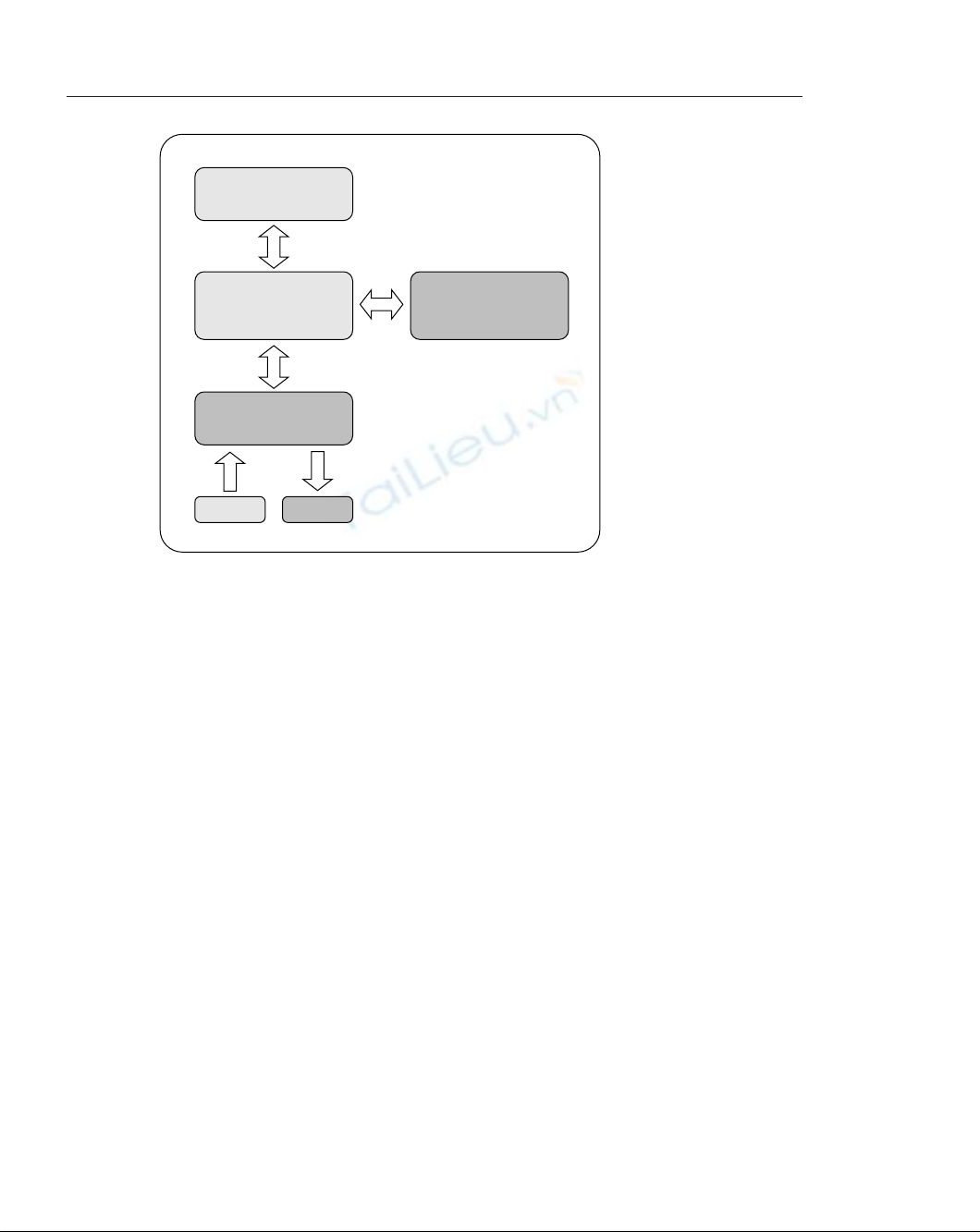
Figure 4-3: High-level architecture diagram of an intranet application
using our framework.
Using an HTML template-based presentation layer
All input and output to and from the application is handled via a template-driven
HTML presentation layer. When the application needs input from the user, it pre-
sents an HTML page generated from an appropriate HTML template. Similarly,
when the application needs to display output, it generates an HTML page by replac-
ing special application-specific tags within the template. This ensures that cosmetic
changes to the input or output interfaces can be done without requiring help from
the application developer. For example, an application that uses the template-based
presentation layer can have its interface modified by an HTML writer or graphics
artist.
Using PHP Application Framework components
The components in the PHP Application Framework (PHPAF) layer implement the
base application by providing the following services:
◆Database abstraction support: See the “Relational database” section later
in this chapter for details.
◆Centralized authentication support: All applications defer the login and
logout to the central authentication facility, as discussed earlier in this
chapter.
Relational
Database
Business Logic
Your PHP
Application
PHP Application
Framework
Components
HTML Template-based
Presentation Layer
INPUT OUTPUT
68 Part II: Developing Intranet Solutions
07 549669 ch04.qxd 4/4/03 9:24 AM Page 68
◆Override authorization support: Each application using the intranet
application defines its own authorization method.
◆Debugging support: An application needs to be debugged many times
during the development process. Because debugging is a core part of the
development process, the framework includes a built-in debugger. The
current implementation is very simple yet useful.
◆Internationalized error and status message handling support: Each
application using the framework must use a central error message
and status message repository. Both error and status messages can be
internationalized.
Business logic
Each application has its own business-logic requirements. The business-logic
objects will be given database connectivity from the application framework. This
ensures that database abstraction is maintained.
Relational database
The relational database access is abstracted from the application using an abstrac-
tion layer, which is part of the application framework. This ensures that application
database requirements can change without drastically affecting the application. For
example, an application can be developed with this framework such that it works
with the widely used, high-performance MySQL database and then deployed in an
environment where the database is Oracle. Of course, the developers have to be
careful not to use any vendor-specific features.
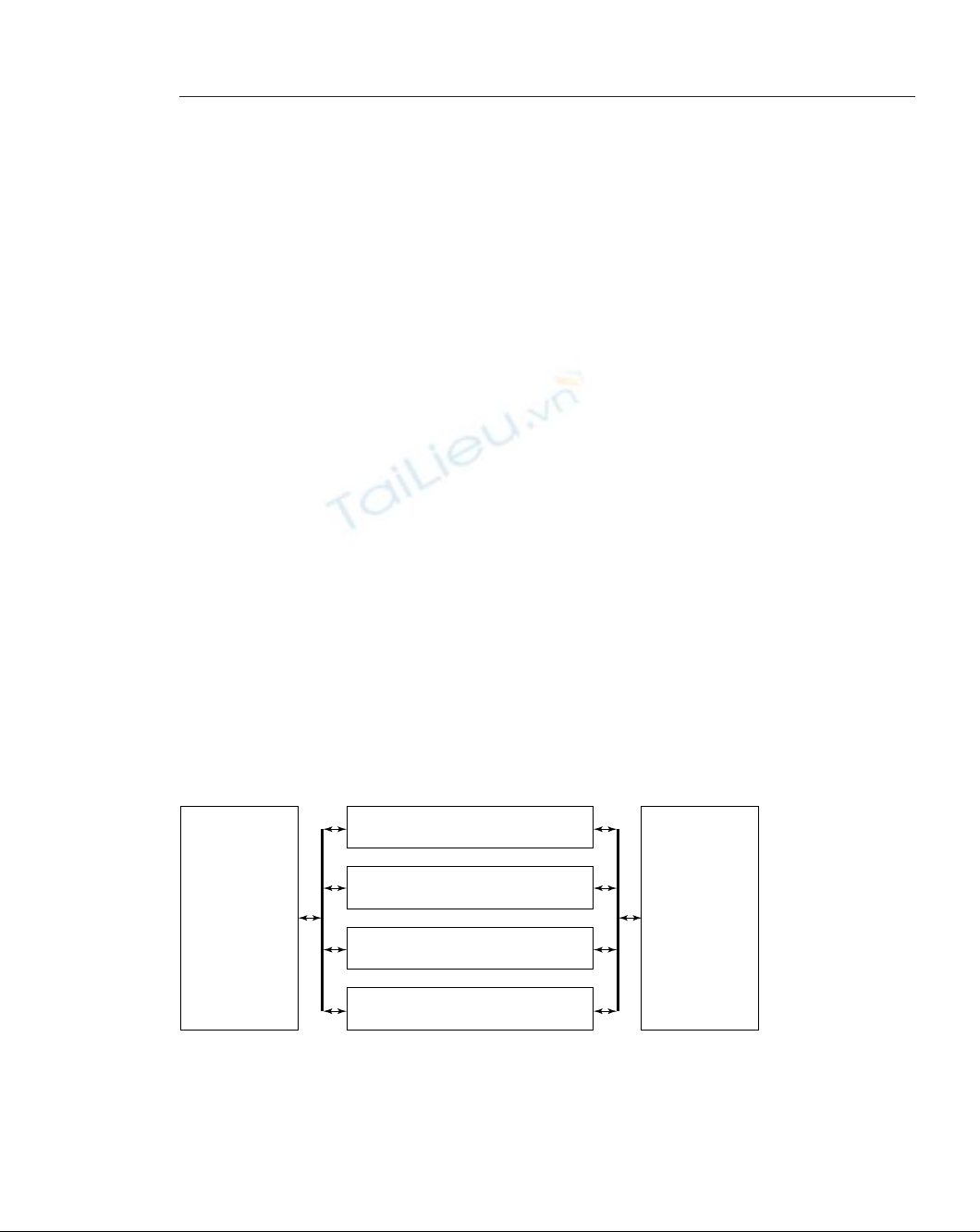
Figure 4-4 shows a block diagram of an application that uses the previously
mentioned application framework.
Figure 4-4: A block diagram of an application using the PHP Application Framework.
Application Specific
Error and Status
Messages
(Supports
Internationalization)
Database
Independent
Abstraction
Authentication
(Valid User Credentials)
Authorization
(Application Specific Authorization Requirements)
Application Run()
(Application Specific Driver Code)
Business Logic Objects
(Application Specific Code)
Chapter 4: Architecture of an Intranet Application 69
07 549669 ch04.qxd 4/4/03 9:24 AM Page 69
The application checks for valid user credentials in the authentication phase,
which is already supplied by the framework’s login application for valid users.
The authorization step involves application-specific privilege management. Not
all valid (authenticated) users are likely to have the same privilege based on the
type of application. For example, an Employee Information System (EIS) applica-
tion in an engineering firm can assign different privileges to executive manage-
ment, department heads, team leaders, and engineers. This is why the authorization
code is specific to the instance of the application and should be written by the
application developer and should not be provided by the framework.
When an application has gone through the authentication and authorization
phases, it will run the application. This code will involve invoking application spe-
cific business objects and database interaction.
The application will have database access via the database-independent abstrac-
tion and also will produce status messages and errors using the facilities provided
by the framework.
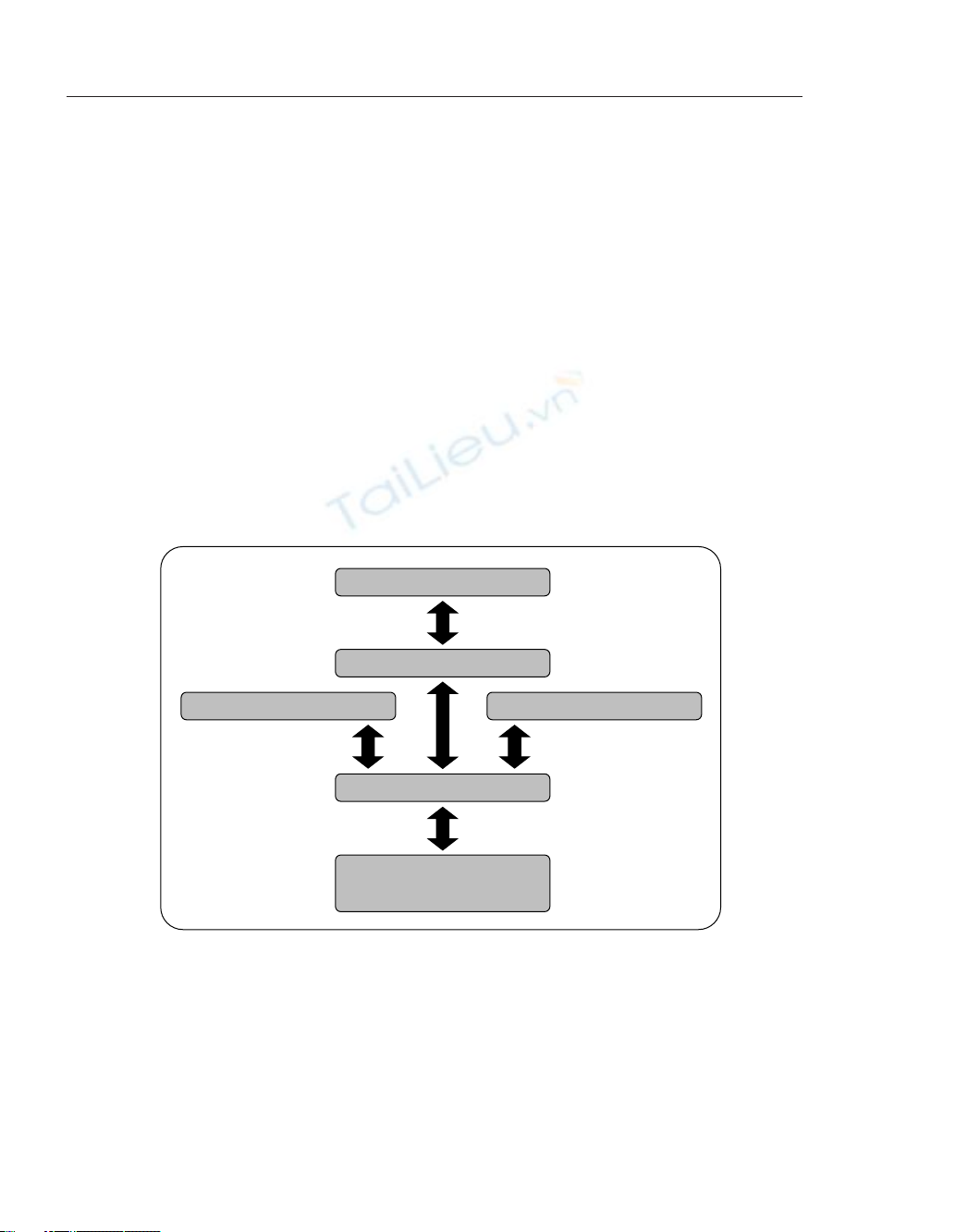
Figure 4-5 shows a real-world application framework that we will create in this
chapter.
Figure 4-5: A real-world PHP Application Framework.
The core of this framework is the class.PHPApplication.php. This class provides
an abstract PHP application that you can extend to incorporate facilities provided by
the error handler (class.ErrorHandler.php), the debugger (class.Debugger.php),
and the database abstraction (class.DBI.php).
DB.php (from PEAR)
class.PHPApplication.php
class.Debugger.phpclass.ErrorHandler.php
class.DBI.php
Your PHP Application Business
Logic
70 Part II: Developing Intranet Solutions
07 549669 ch04.qxd 4/4/03 9:24 AM Page 70








![Giáo trình Hướng dẫn thực hành Quản trị an toàn hệ thống: Phần 2 [Mới nhất]](https://cdn.tailieu.vn/images/document/thumbnail/2026/20260306/hoaphuong0906/135x160/83901773031107.jpg)


