

sonera | medialab
Mobile Java Application Development
White Paper
Sonera MediaLab
www.medialab.sonera.fi
info@medialab.sonera.fi
September 12, 2002
Copyright © 2002 Sonera MediaLab
This document is provided
as is
without any warranty of any kind.
The opinions expressed herein are subject to change without notice.
sonera | medialab
Mobile Java Application Development White Paper 1 © 2002 Sonera MediaLab
Mobile Java Application Development
1 INTRODUCTION
Nowadays most new mobile phones are able to run downloaded external applications, not just
the ones preinstalled on the device by the manufacturer. These applications can be native
applications for the device’s own operating system or platform independent applications that are
run on special virtual machine (VM) software on the device. Java2 Micro Edition (J2ME) [1]
offers a special environment for creating platform independent applications on mobile phones
and other handheld devices. J2ME is divided into two parts: configurations and profiles. The
configurations are specified by the memory size and computing power of the device, whereas the
different profiles are specified by the user interface. The Mobile Information Device Profile
(MIDP) [2,3] is targeted for mobile phones and is widely supported by all the major mobile
phone manufacturers. Platform independence and wide support make J2ME and MIDP a
interesting platform for mobile applications such as games. This white paper discusses
developing applications for MIDP version 1.0. The upcoming version 2.0 will have many new
features and extensions, but these are not within the scope of this document.
2 MIDP TECHNOLOGY
2.1 Overview
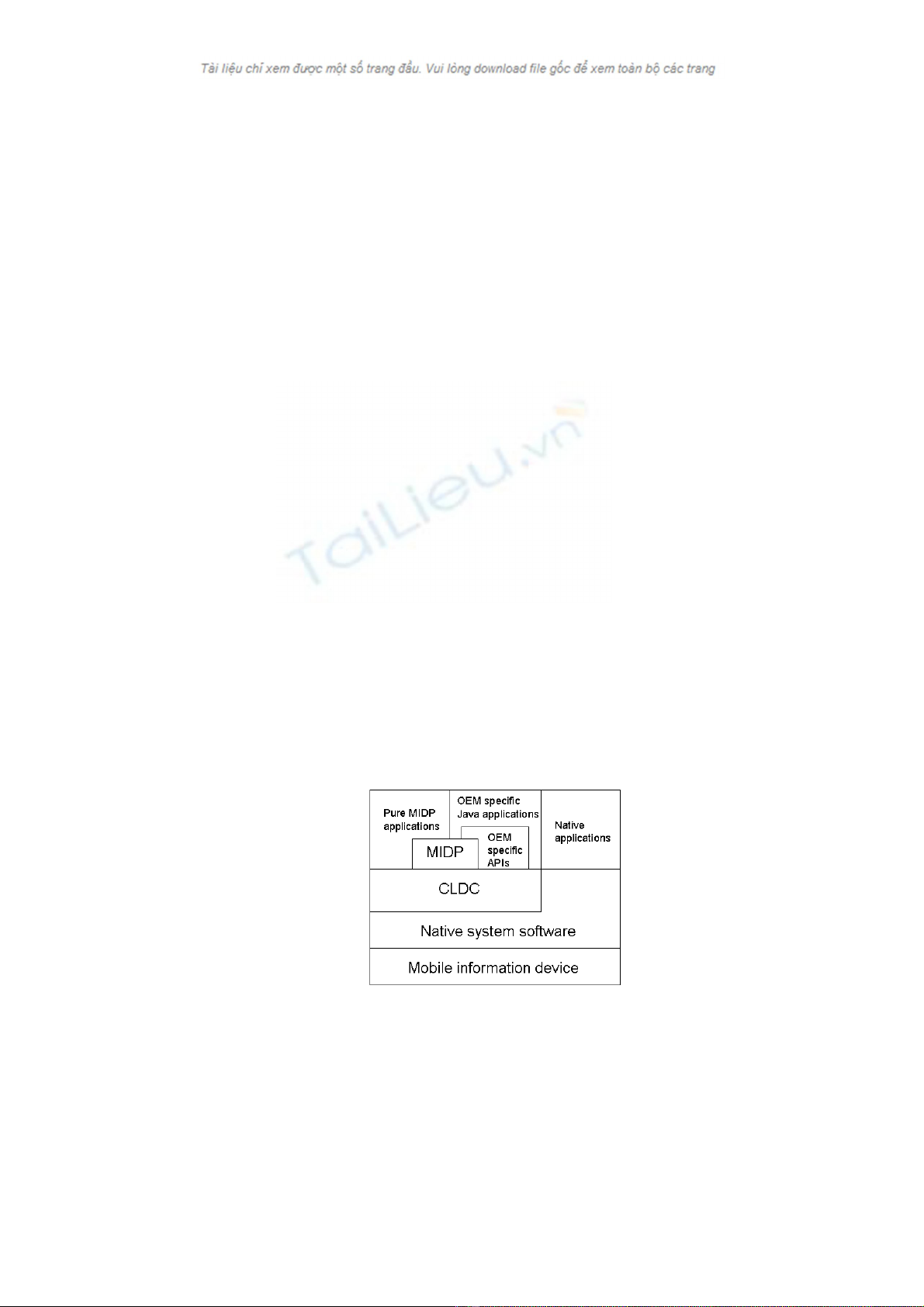
MIDP technology is based on Java2 Micro Edition and Connected, Limited Device
Configuration (CLDC) by Sun Microsystems, Inc (see Fig. 1). CLDC is one of two
configurations of Java2 Micro Edition. It is the foundation of the Java runtime environment
targeting small, resource-constrained devices, such as mobile phones, personal digital assistants,
and small retail payment terminals that have less than 512 kB of memory. MIDP is designed
for creating applications and services to be run in small network-connectable handheld devices
like mobile phones. The MIDP specification lists some requirements for the device and the
MIDP application programming interface (API). MIDP applications are called MIDlets.
Figure 1: MIDP Architecture.
2.2 Mobile Information Device (MID)
MIDP compatible devices (MIDs) must satisfy some hardware and software requirements.
These requirements make it possible to use a common MIDP API on all devices. The device
itself can be a mobile phone, PDA, two-way pager or any other handheld device.
sonera | medialab
Mobile Java Application Development White Paper 2 © 2002 Sonera MediaLab
2.2.1 Minimum hardware requirements
The MIDP specification gives the following minimum requirements for the hardware of the
device:
• Display: screen size 96x54 pixels, color depth: 1 bit, aspect ratio approximately 1:1.
• Input: (one or more of the methods must be supported): one-handed keyboard (ITU-T phone
keyboard), two-handed keyboard (QWERTY keyboard), or touch screen.
• Memory: 128 kB of non-volatile1 memory for MIDP components, 8 kB of non-volatile
memory for application-created persistent data, 32 kB of volatile memory for the Java
runtime.
• Network: two-way, wireless, limited bandwidth.
2.2.2 Minimum software requirements
MIDP also specifies some software requirements for the device’s operating system and virtual
machine. Some of the requirements are quite obvious: the device must have a kernel to manage
hardware and scheduling, there must be a mechanism to read from and write to non-volatile
memory, and there must be read and write access to the network interface. The system should
also provide a time base for timer APIs and time stamping of persistent data. Software for
application life cycle management should also be implemented. The system must also provide a
minimal capability to write to a bit-mapped graphics buffer and to capture user input from one
(or more) of the three input mechanisms (see minimum hardware requirements).
2.3 Application delivery and lifetime
One or more MIDlet applications can be packed to one MIDlet suite. MIDlet suites consist of
two parts: the Java Application Descriptor (JAD) describes the applications in the suite and the
Java Application Resource (JAR) holds the actual applications. The suites can be delivered to
the mobile device by WAP, HTTP, IR, or Bluetooth, for example. The devices usually have
special application management software to handle the downloading and life cycle of the
applications. This software can also be called Java Application Manager (JAM) and it must be
capable to browse or locate JADs, transfer JADs and JAR files to the device, install the
downloaded MIDlet suite on the device, execute MIDlet suites, and allow the user to remove
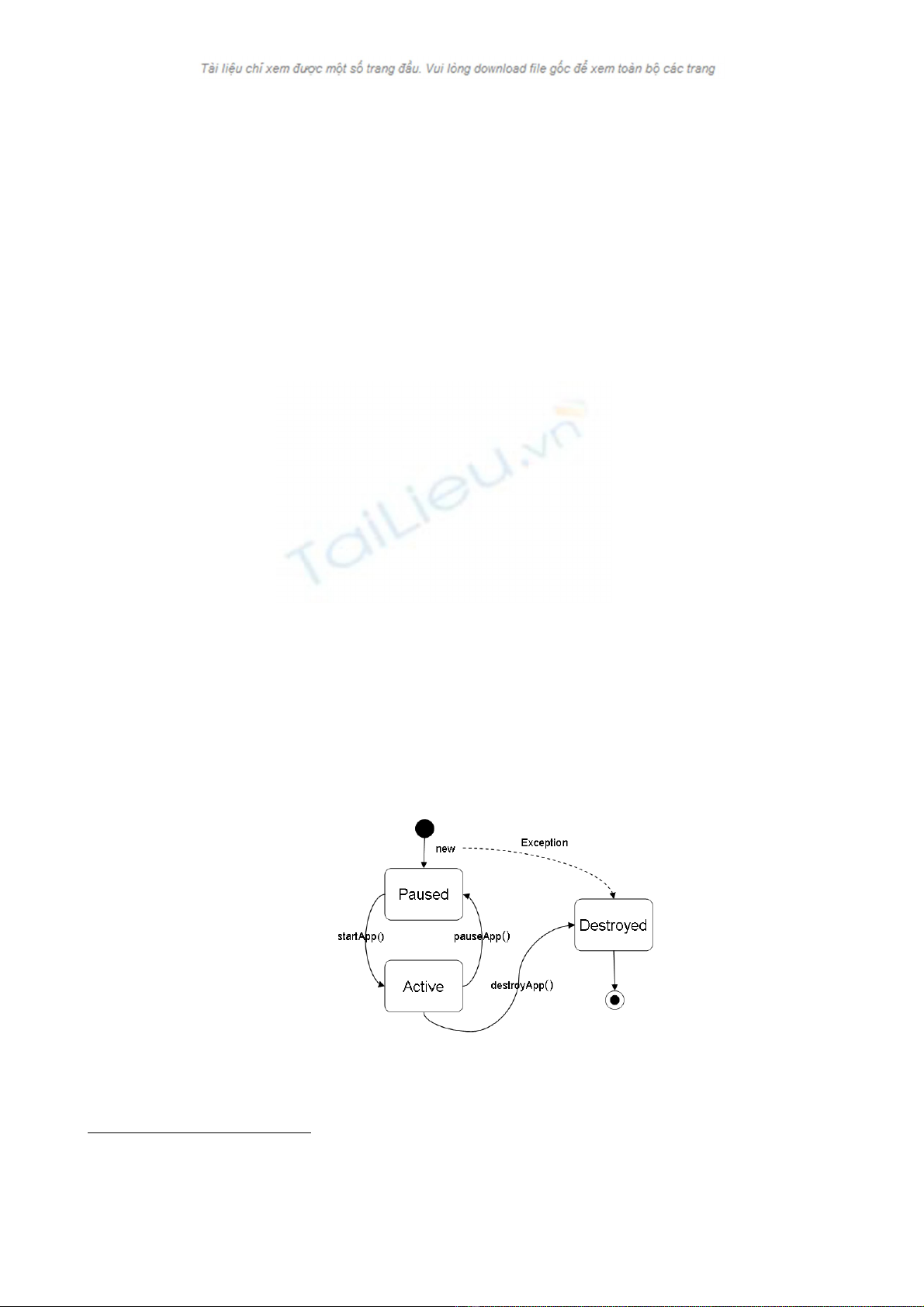
MIDlet suites stored on the device. A MIDlet’s life cycle is illustrated in Figure 2.
Figure 2: MIDlet life cycle.
1 Volatile memory does not retain its contents when the user turns the device off. No special setup is needed to access the volatile memory. The
most common type of volatile memory is DRAM. On the other hand, non-volatile memory retains its contents when the device is turned off. Non-
volatile memory is usually accessed in read mode, a special setup may be required to write to it. Examples of non-volatile memory include ROM,
flash, and battery backed SDRAM.
sonera | medialab
Mobile Java Application Development White Paper 3 © 2002 Sonera MediaLab
3 DEVELOPMENT TOOLS
3.1 Compiling and building
MIDP applications are Java applications, which means that Java 2 Platform, Standard Edition
(J2SE) and its tools are needed to build them. It is also recommended that possible Integrated
Development Environments (IDEs) are installed before installing the J2ME Wireless Toolkit
(J2MEWT) [8].
3.2 J2ME Wireless Toolkit
J2MEWT is a set of tools that provides application developers with the emulation environment,
documentation and examples needed to develop Java technology applications targeted for
CLDC/MIDP compliant mobile phones and PDAs. J2MEWT can be tightly integrated with third
party development environments such as Sun ONE Studio (formerly Forte for Java), providing a
complete environment with which developers can write, test and debug applications from start
to finish.
3.3 Integrated developing environments
J2MEWT provides tools and libraries for building and emulating MIDP applications. It does
not contain any graphical user interface for application development. However, there are several
IDEs that can be integrated with J2MEWT and can be used to develop MIDP applications.
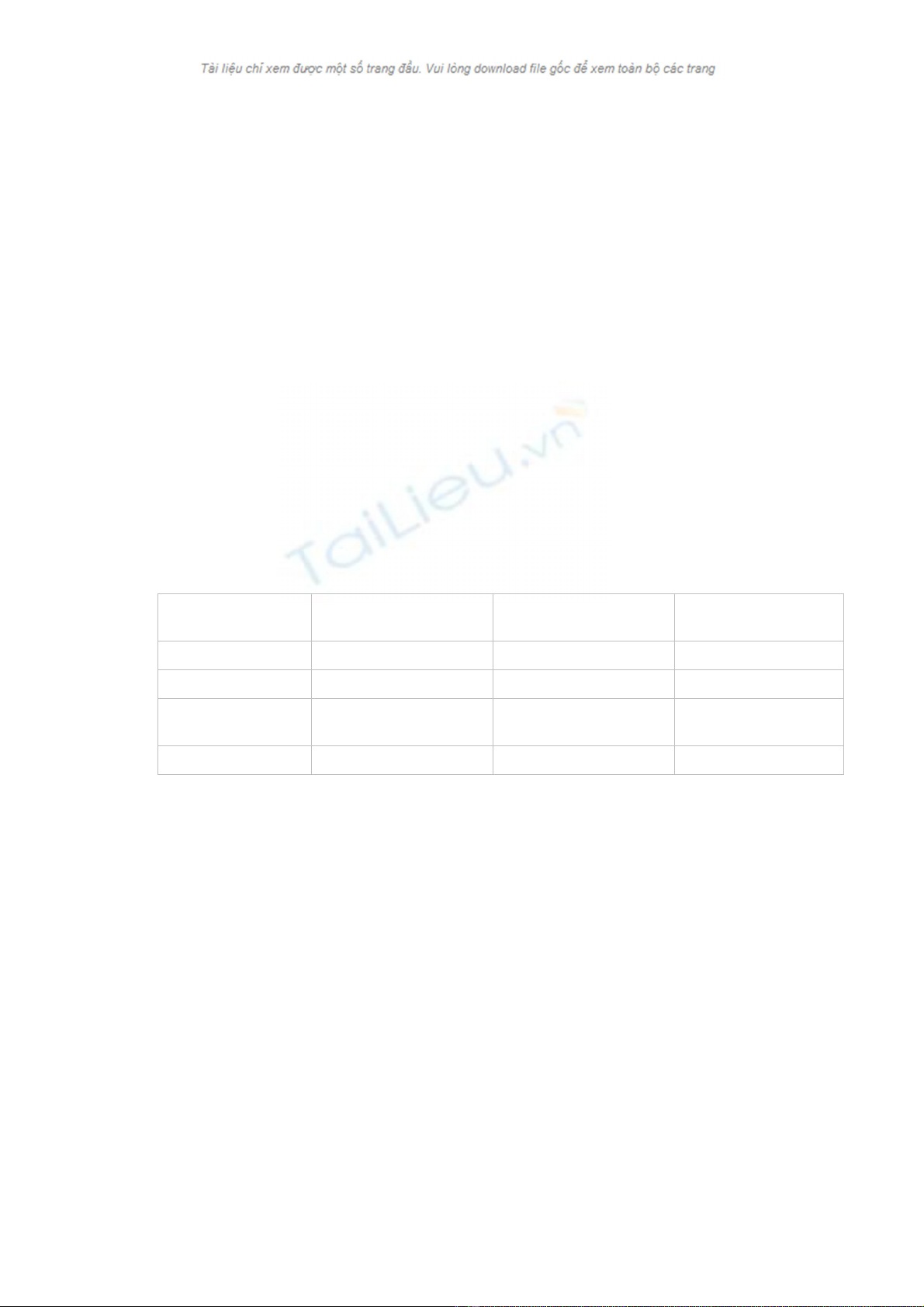
Some of the most common IDEs are compared in Table 1.
Table 1: Some development environments.
3.4 Emulators
MIDP applications can be run on numerous emulators. J2MEWT and development tools
support device emulators by device manufacturers and therefore testing applications on different
platforms becomes somewhat easier. However, as the performance and features of the
emulators may be different from the real device, applications should also be tested on the actual
devices.
4 PROGRAMMING INTERFACES
4.1 MIDP API
The MIDP API consists of five different parts. The base is the core API that provides system
level input and output, as well as the Java2 language and utility classes. These are mainly
imported from J2SE, although they are somewhat slimmed down from the originals. Next, there
is the MIDlet package that defines the application life cycle API and the possible interactions
between the application and the environment in which the application runs. Persistent data
storage is defined in the Record Management System API. The user interface API provides a
minimal set of features for implementation of user interfaces for MIDP applications. There are
Product: Sun ONE Studio 4.0 [9] JBuilder 7 with
MobileSet 3 [10]
Wireless Studio 7 [11]
Developer: Sun Microsystems Borland CodeWarrior
Price: Free $399 (JBuilder7SE) $599
System: Windows, Solaris, Linux Windows, Solaris, Linux,
Mac
Windows
Free trial available: Yes Yes Yes

sonera | medialab
Mobile Java Application Development White Paper 4 © 2002 Sonera MediaLab
also functions to set timers and get notification when they expire in the user interface API.
MIDP includes networking support based on the generic connection framework from the CLDC.
In addition to the input/output classes specified in the CLDC, MIDP includes the interface for
HTTP protocol access over the network.
4.2 Manufacturers’ own APIs
The MIDP API was designed to be hardware independent, so there is no way to access the
device’s hardware directly. However, applications like action games need often low-level access
to the device hardware such as the keyboard, display, lights, vibration and speaker. Applications
could also want to use the device’s other capabilities like GSM phone, SMS (or MMS)
messaging, phone book, camera and so on. For these purposes, many device manufacturers have
introduced their own APIs [4,5,6]. The upside is that these APIs give developers a lot of
possibilities to take advantage of the devices’ capabilities. On the other hand, these APIs usually
work only on that particular device or maybe on a couple of other devices in the same product
family. Using these APIs usually ruins the platform independency of MIDP.
5 RESTRICTIONS
Because MIDlets can be run on very different kinds of devices, there are quite a lot of
restrictions to keep in mind when developing platform independent MIDlets. Limited memory
size is one of the most significant restrictions. Some devices restrict the size of the MIDlet suite,
so larger applications can not be downloaded or executed. The first Java capable phones were
taken in public use in Japan in January 2001, where DoCoMo’s i-mode phones had 10 kB of
memory. In April 2002, the memory was upgraded to 30 kB in the new generation of i-mode
Java phones, but the size of the memory is still very small. The first Java phones for the
GSM/GPRS market were introduced in 2002 and have typically at least 30 kB of memory for
Java applications. It is challenging to get all the data and code of graphical applications like
games to fit into this size. Therefore, some game developers have introduced overlaying
techniques similar to MS-DOS programming ten years ago. When you play one level of a game,
the game automatically downloads – with the player’s permission – the next level and the play
can continue. Each level can be coded to fit into 30 kB, for example.
Processor speed may restrict some calculations on low end devices, but most recently released
devices have ample processing power, so speed is not generally speaking a big problem. Because
of the lack of floating point units on mobile devices, there is no implementation of floating point
math in MIDP. All calculations must be performed using integer or fixed point math.
Different types of screens are probably the biggest problem when developing platform
independent games or other graphical applications. The first issue is the screen size. The MIDP
specification states only that the screen size should be at least 96x54 pixels. The developer must
decide if he wants to take advantage of bigger screens or whether to design the application to fit
a small screen. Another issue is color depth. It is very hard to produce good looking color
graphics that also look good on black and white screens.
Different kinds of keyboards can also be a big problem when developing platform independent
mobile games. The layout of the keyboard can be different on different devices, and devices with
touch screens may not have a keyboard at all. An additional problem is the fact that some
devices may not recognize key repeating.
Network sockets are not supported, as MIDP only uses the HTTP protocol. Also the bandwidth
of the network interface can be very limited (for example, when using GSM data as the data
bearer).


![Tài liệu Javascript cho người mới: Từ cơ bản tới nâng cao [A-Z]](https://cdn.tailieu.vn/images/document/thumbnail/2026/20260505/baobinh_011/135x160/7251777990882.jpg)


%20--%3e%3cdefs%3e%3cstyle%3e%20.st0%20{%20fill:%20%23fff;%20}%20.st1%20{%20fill:%20%237800fa;%20}%20%3c/style%3e%3c/defs%3e%3cpath%20class='st1'%20d='M117.78,12.18H43.11c2.9,3.47,4.65,7.94,4.65,12.82,0,5.6-2.3,10.66-6.01,14.29h76.02l7.22-13.56-7.22-13.56Z'/%3e%3cg%3e%3cpath%20class='st0'%20d='M53.58,26.17h-.59v-1.46h.59v-4.96h2.83c1.78,0,2.67.94,2.67,2.82v5.76c0,1.87-.89,2.81-2.67,2.81h-2.83v-4.96ZM55.36,21.37v3.34h1.1v1.46h-1.1v3.34h1.01c.61,0,.91-.37.91-1.1v-5.93c0-.74-.3-1.1-.91-1.1h-1.01Z'/%3e%3cpath%20class='st0'%20d='M65.99,31.14h-1.8l-.31-2.07h-2.19l-.31,2.07h-1.64l1.82-11.39h2.62l1.82,11.39ZM65.28,18.04c-.25.46-.51.77-.75.94-.21.15-.47.22-.79.22-.26,0-.57-.07-.92-.22l-.38-.15c-.14-.05-.26-.07-.37-.07-.3,0-.53.18-.71.54l-.91-.68c.25-.46.51-.77.75-.94.21-.14.48-.21.79-.21.26,0,.57.07.92.21l.38.15c.14.05.26.07.37.07.3,0,.53-.18.71-.54l.91.68ZM61.91,27.52h1.73l-.87-5.76-.87,5.76Z'/%3e%3cpath%20class='st0'%20d='M74.53,26.89v1.52c0,1.91-.89,2.86-2.67,2.86s-2.67-.95-2.67-2.86v-5.93c0-1.91.89-2.86,2.67-2.86s2.67.95,2.67,2.86v1.11h-1.69v-1.22c0-.75-.31-1.12-.93-1.12s-.93.37-.93,1.12v6.15c0,.74.31,1.11.93,1.11s.93-.37.93-1.11v-1.63h1.69Z'/%3e%3cpath%20class='st0'%20d='M81.4,31.14h-1.8l-.31-2.07h-2.19l-.31,2.07h-1.64l1.82-11.39h2.62l1.82,11.39ZM75.9,19.2l1.52-1.91h1.71l1.51,1.91h-1.61l-.76-.95-.75.95h-1.61ZM77.32,27.52h1.73l-.87-5.76-.87,5.76ZM83.1,15.99l-1.76,1.91h-1.26l1.17-1.91h1.86Z'/%3e%3cpath%20class='st0'%20d='M84.86,19.75c1.78,0,2.67.94,2.67,2.82v1.48c0,1.87-.89,2.81-2.67,2.81h-.85v4.28h-1.79v-11.39h2.64ZM84.01,21.37v3.86h.85c.58,0,.87-.36.87-1.08v-1.71c0-.71-.29-1.07-.87-1.07h-.85Z'/%3e%3cpath%20class='st0'%20d='M93.51,19.75c1.78,0,2.67.94,2.67,2.82v1.48c0,1.87-.89,2.81-2.67,2.81h-.85v4.28h-1.79v-11.39h2.64ZM92.66,21.37v3.86h.85c.58,0,.87-.36.87-1.08v-1.71c0-.71-.29-1.07-.87-1.07h-.85Z'/%3e%3cpath%20class='st0'%20d='M98.8,31.14h-1.79v-11.39h1.79v4.88h2.03v-4.88h1.83v11.39h-1.83v-4.88h-2.03v4.88Z'/%3e%3cpath%20class='st0'%20d='M105.36,24.55h2.46v1.62h-2.46v3.34h3.09v1.63h-4.88v-11.39h4.88v1.63h-3.09v3.18ZM108.17,17.29l-1.76,1.91h-1.26l1.17-1.91h1.86Z'/%3e%3cpath%20class='st0'%20d='M112.2,19.75c1.78,0,2.67.94,2.67,2.82v1.48c0,1.87-.89,2.81-2.67,2.81h-.85v4.28h-1.79v-11.39h2.64ZM111.35,21.37v3.86h.85c.58,0,.87-.36.87-1.08v-1.71c0-.71-.29-1.07-.87-1.07h-.85Z'/%3e%3c/g%3e%3ccircle%20class='st1'%20cx='25'%20cy='25'%20r='20'/%3e%3cpath%20class='st0'%20d='M32.78,19.27c2.92,0,4.43,2.55,5.28,5.33l.71,2.17c.14.38-.33.75-.71.75h-5.61c.19-.33.24-.71.09-1.08l-.75-2.45c-.43-1.32-.99-2.64-1.79-3.77.75-.57,1.65-.94,2.78-.94h0ZM25,18.38c3.25,0,4.9,2.78,5.89,5.89l.76,2.45c.14.42-.33.8-.8.8h-11.69c-.42,0-.94-.38-.8-.8l.75-2.45c.99-3.11,2.64-5.89,5.89-5.89h0ZM25,11.35c1.74,0,3.11,1.37,3.11,3.11s-1.37,3.11-3.11,3.11-3.11-1.41-3.11-3.11,1.41-3.11,3.11-3.11h0ZM17.27,19.27c1.08,0,1.98.38,2.73.94-.8,1.13-1.37,2.45-1.74,3.77l-.8,2.45c-.14.38-.05.75.09,1.08h-5.56c-.42,0-.9-.38-.75-.75l.71-2.17c.9-2.78,2.41-5.33,5.33-5.33h0ZM17.27,12.91c1.51,0,2.78,1.27,2.78,2.83s-1.27,2.83-2.78,2.83-2.83-1.27-2.83-2.83,1.27-2.83,2.83-2.83h0ZM32.78,12.91c1.56,0,2.78,1.27,2.78,2.83s-1.23,2.83-2.78,2.83-2.83-1.27-2.83-2.83,1.27-2.83,2.83-2.83h0ZM27.07,28.56v.09c0,.57-.24,1.08-.61,1.46h0v.05c-.38.33-.9.57-1.46.57s-1.08-.24-1.46-.61h0c-.38-.38-.61-.9-.61-1.46v-.09h1.41v.09c0,.19.05.38.19.47v.05c.09.09.28.19.47.19s.38-.09.47-.19v-.05c.14-.09.24-.28.24-.47t-.05-.09h1.41ZM30.99,28.56v.09c0,1.65-.66,3.16-1.74,4.24-1.08,1.08-2.59,1.79-4.24,1.79s-3.16-.71-4.24-1.79l-.05-.05c-1.04-1.08-1.7-2.55-1.7-4.2v-.09h1.41v.09c0,1.27.47,2.4,1.27,3.25h.05c.85.85,1.98,1.37,3.25,1.37s2.4-.52,3.25-1.37c.85-.8,1.37-1.98,1.37-3.25v-.09h1.37ZM34.99,28.56v.09c0,2.78-1.13,5.28-2.92,7.07-1.79,1.79-4.29,2.92-7.07,2.92s-5.23-1.13-7.07-2.92c-1.79-1.79-2.92-4.29-2.92-7.07v-.09h1.41v.09c0,2.4.94,4.53,2.5,6.08,1.56,1.56,3.72,2.5,6.08,2.5s4.52-.94,6.08-2.5c1.56-1.56,2.5-3.68,2.5-6.08v-.09h1.41Z'/%3e%3c/svg%3e)